Blog
How to build a company brain, part 6: skills that make every agent work the same way
- Company brain
- AI agents
- Skills
Rules tell an agent what it must not do. A skill tells it how a job gets done, step by step, so any agent and any new teammate does it the same way. In the Termino brain each skill is a small folder with one file in it, SKILL.md. Claude Code picks that file up as a command you can type, such as /organise, and also reaches for it on its own when a request matches the skill's description.
Key takeaways
- A skill is a folder with a SKILL.md file: a short description of when to use it, the steps, where results get filed, and a checklist.
- The description does the triggering. Put the phrases people really say into it, most important first.
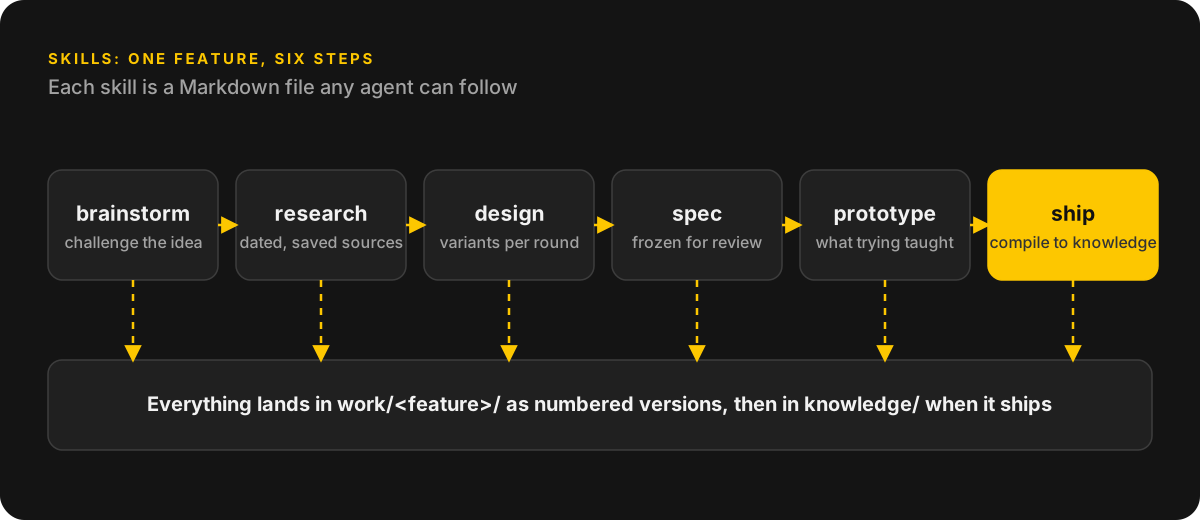
- Six skills carry a feature from idea to release: brainstorm, research, design, spec, prototype, ship.
- Housekeeping skills (organise, analyse, digest, maintain) keep the brain tidy between features.
- The steps sit in a file, so the work comes out much the same whichever agent or person did it.
What a skill looks like
Every skill file has the same parts. A few lines at the top, called frontmatter, hold a description: what the skill does and when to use it. Under that come the steps in order, where each result is filed, and a checklist the agent has to tick off before it syncs.
The description matters more than it looks, because Claude Code reads it to decide when to load the skill. Write "Use for: what do competitors do, research X, compare us with" and the agent picks the research skill without being told. Put the main use first. Claude Code cuts the description off at 1,536 characters in its skill list, so a trigger buried at the end may never be seen.
Project skills live in .claude/skills/, one folder per skill, and the folder name becomes the command. Commit that folder to the brain's repository and everyone on the team gets the same skills.
The six feature skills
At Kranich a feature moves through six skills. Each one writes numbered versions into the feature's work folder.
- brainstorm: checks what already exists, asks a few pointed questions, pushes back on the idea and writes a versioned brainstorm.
- research: competitor, market or user research with dated, saved sources. Part 8 covers it.
- design: UI variants built on the team's real design system, one version per round.
- spec: the next spec version in the house format, frozen for review before developers see it.
- prototype: a throwaway build on its own branch, plus a note on what the team learned from trying it.
- ship: once the feature is live, compiles its work folder into the knowledge page and checks that page against the code.
Housekeeping skills
Four more skills keep the brain in order. Organise files everything in the drop folder, summarises it and updates the index and the graph. Analyse takes one raw source, a meeting transcript for example, and turns it into filed facts, decisions and feedback. Digest writes the daily, weekly and monthly journal. Maintain looks for stale pages, orphans, broken links and sources still waiting for a summary.
Write your first skill
Start with the job you explain most often. I'd guess that's "organise" or "research". Write it once and run it. Every time the agent does something you didn't want, fix the file, not the chat. After a few rounds the skill describes how your company really does that job.
One practical note from the Claude Code docs. Claude Code notices edits to a skill while a session is running. But if the .claude/skills folder didn't exist when you started the session, type /reload-skills once so it finds the new one.
Goal: create an "organise" skill for this brain.

Inputs: this repository, BRAIN.md and the SUMMARY.md files.

Do this: create .claude/skills/organise/SKILL.md. Start it with frontmatter that has one field, description: "Files everything in the drop folder into the right place and updates the summaries. Use for: organise, file this, I dumped files, clean up the inbox." Below the frontmatter write the steps: list everything in inbox/; for each item read the matching folder's SUMMARY.md, file a copy there, write a short summary next to it, add a row to that folder's Contents table and update Latest update; write "unknown" for any fact you cannot confirm and say what would confirm it. End the file with a checklist: every item filed, every summary updated, lint passes, one log line written.

Constraints: never delete and never move an original, copy it. Do not run the skill yet.

Definition of done: the file exists, you show it to me, and you tell me how to invoke it.Frequently asked questions
What is an agent skill?
A folder with a SKILL.md file that tells an AI agent how to do one job: when to use it, the steps, where results go and a checklist. In Claude Code you can call a skill by typing a slash and its name, and Claude also loads it by itself when your request matches the description.
How many skills does a brain need?
Start with two: organise and research. Add another when you catch yourself explaining the same job to an agent for the third time.
Do skills lock me into one AI tool?
No. A skill is plain Markdown, and Claude Code's docs say its skills follow the Agent Skills open standard, which other AI tools use too. Some frontmatter fields are Claude Code extras, so keep to a description if you want the file to travel. An agent with no skill support can still be told to read the file and follow it.
Sources
- Claude Code Docs: skills code.claude.com
Talk to me
Building an AI product and need someone senior to own the technical side? Book a free 30-minute call.